The mess that triggered this
A few months ago, my AI tool usage looked like most engineers’ AI usage.
I was exploring several AI coding assistants — IDE-integrated ones, terminal agents, chat-based models — often more than one at a time. There was no system, no structure, no baseline. Which meant five things, all bad:
- Every session started from zero. I re-explained the project to the AI on every new chat — what the repo does, how the stack is wired, what the deployment model looks like.
- Same task, different answers. The same question in two different tools got different and often contradictory output, because the prompts and pre-loaded context were different.
- No reuse. Whatever prompt finally worked died in my local history.
- No guardrails. The AI happily edited files it had no business touching, because nothing told it not to.
- The tools’ actual capabilities — skills, memory, rules, hooks, subagents — were unused. I had powerful agents and was using them as fancy autocomplete.
Underneath all five was a vocabulary problem. CLAUDE.md, AGENTS.md, skills, workflows, workpacks, rules, agents, subagents, hooks, MCPs, plugins. Read any one piece of documentation and you walk away with a useful but isolated definition. Read all of them and the definitions blur into each other. Is a skill just a small workflow? Is a rule just a CLAUDE.md fragment? When do I reach for a subagent versus a skill? Where do MCPs fit?
The confusion itself was slowing me down.
So I spent a few weeks pulling on the threads, and I want to share the mental model I landed on. It is two lenses and one diagnostic question, and once it clicked it made every other construct fall into place.
Two lenses: Context and Capability
Treat AI setup like onboarding a new engineer.
What makes a new hire useful on day one? Two things. What they know — the wiki, the architecture, the conventions, who owns what. And what they can do — the team CLI, the runbooks, the repo permissions, the deploy access.
AI is the same. Except an AI “onboards” every single session. So you declare it once, and every session starts from the same baseline.
That gives us the spine:
- Context layer — what the AI knows when it wakes up.
- Capability layer — what the AI can do.
And the diagnostic question that slots every construct into the right lens:
If I remove this construct, does the model lose something it knows or assumes? → Context. If I remove this construct, does it lose something it can invoke or do? → Capability.
A handful of constructs are both — they ship procedural knowledge and are independently triggerable. Those are the hybrid layer, and they’re where most of the leverage lives.
That’s it. Three buckets: Context, Capability, Hybrid. Plus a packaging layer on top so the work is portable.
The rest of this post is what goes in each bucket, why, and the specific places where I’ve watched teams get tripped up.
The Context Layer: What the AI knows when it wakes up
CLAUDE.md — the team constitution
CLAUDE.md is a plain markdown file that the agent loads automatically into its context window at the start of every session. It is declarative, not imperative. It states facts and rules; it does not run logic.
The way I think about what belongs in it: specific, concrete, always-true facts the agent cannot figure out from the code alone.
Things that go in:
- First principles (“we collapse stack traces below the application layer”).
- Stack and versions (“Spring Boot 3, Java 21, Gradle”).
- Lifecycle facts that aren’t in code (“SDK x.y goes EOL Q3”).
- Architectural guardrails (“max 10 cardinality on metric labels”).
- Why decisions (“this service runs on BOSH, not K8s, because legacy — a migration is in flight but not done”).
- Project layout pointers that aren’t obvious from a tree (“the Helm vars for this repo come from this other repo”).
Things that don’t:
- Multi-step procedures — that’s a skill.
- Instructions scoped to one file path — that’s a rule.
- Personal preferences — that’s
CLAUDE.local.md. - Secrets —
.env, gitignored. - Long architecture docs — link them via
@import. - Vague guidance like “write clean code.” It wastes tokens and means nothing.
A couple of rules of thumb I’ve come to trust:
- Aim for under ~200 lines. If yours is bigger, split via
@import, nested CLAUDE.md, or path-scoped rules. The context window is a budget; spend it carefully. - Write it by hand. Don’t run
/initand call it done. A bad line of code is one bad line of code. A bad line of CLAUDE.md fans out into many bad plans and many more bad lines of code. - An outdated CLAUDE.md is worse than no CLAUDE.md. Treat it like a living doc, not a setup artifact.
How it loads
This is the part most people skip and then get confused later, so worth being precise.
At session start, the agent walks up from the cwd through every parent directory. Every CLAUDE.md and CLAUDE.local.md it finds along the way is loaded in full and concatenated — more specific scopes win on conflict. CLAUDE.md files in subdirectories below the cwd load on demand, only when the agent opens a file there. The project-root CLAUDE.md survives /compact (it gets re-injected); nested ones reload lazily. HTML comments are stripped before injection, which is a useful trick if you want a note-to-self that the agent never sees.
There are four scopes, and the rule is to pick the narrowest one that still works:
| Scope | Location | Shared with |
|---|---|---|
| Managed policy | /etc/claude-code/CLAUDE.md |
All users in the org |
| Project | ./CLAUDE.md or ./.claude/CLAUDE.md |
Team, via git |
| User | ~/.claude/CLAUDE.md |
Just you, all projects |
| Local | ./CLAUDE.local.md |
Just you, this project |
In-session, run /memory to see exactly which CLAUDE.md files got loaded for your current cwd.
Hierarchy across a multi-repo team
The single biggest unlock for me was realising you don’t write one CLAUDE.md — you write a hierarchy.
- Workspace root — identity, design philosophy, cross-repo relationships, the workspace layout itself.
- Domain level (e.g.
api/,infra/,sdks/) — what this group of repos does end-to-end, the data flow through this domain, domain-specific conventions. - Repo level — architecture, deployment model, the gotchas you’d put in a one-page handover doc.
Each level adds specificity without repeating its parent. The parent already tells the AI what kind of system this is; the domain already tells it how data flows through this part of the stack; the repo only has to say “this service is deployed via BOSH, not K8s, and the manifests live here.” That’s the layering paying for itself.
AGENTS.md — same job, vendor-neutral
AGENTS.md does the same thing as CLAUDE.md, but it’s a vendor-neutral standard — Cursor, Devin, Copilot, and others read it too. If you don’t want to be locked to one tool, write the substance in AGENTS.md and have your CLAUDE.md be a one-liner: @AGENTS.md. Or, even cheaper on tokens, symlink one to the other so there’s exactly one file on disk.
Rules — conditional CLAUDE.md fragments
Rules files live in .claude/rules/ and are essentially modular CLAUDE.md fragments scoped to parts of the codebase. They come in two flavors:
Unconditional rules (no paths: in frontmatter) load at session start, same as CLAUDE.md. Always present. Good for project-wide conventions you didn’t want to fold into CLAUDE.md itself.
Path-scoped rules (paths: ["tests/**/*.py"]) do not inject at session start. They load only when the agent opens a file matching the glob. This is the part that earns its keep — it keeps your context lean. Testing conventions only matter when writing tests; they shouldn’t eat tokens every time you touch a non-test file.
A canonical shape:
---
paths:
  - "tests/**/*.py"
description: "Python testing rules"
---

# Python Testing Rules
- Arrange-Act-Assert pattern
- Fixtures live in conftest.py
- Mock external APIs; never hit real services
- Maintain 80%+ coverage via pytest --cov=src
The mental model: CLAUDE.md is always on. Rules can be conditional. Use CLAUDE.md for things the AI always needs to know. Use rules for guidance that’s only relevant when touching specific files.
The Capability Layer: What the AI can do
The context layer tells the agent what it needs to know. The capability layer gives it arms and legs: external tools, specialist workers, deterministic automation. There are three constructs, and the thing to internalize is that each one loads at a different moment and costs a different amount of context.
| Construct | What it adds | When it loads | Context cost | Lives in |
|---|---|---|---|---|
| MCP | External tools / data | Names at start, schemas on demand | Low | .mcp.json (project) or ~/.claude.json |
| Subagents | Specialist workers with fresh context | On spawn | Low in main session | .claude/agents/*.md |
| Hooks | Deterministic automation / guardrails | On trigger | Zero — runs outside the model | settings.json / .claude/settings.json |
MCP — connections to the outside world
Model Context Protocol is the toolbelt. It’s how the agent talks to Jira, GitHub, Confluence, your internal databases, your monitoring stack. Tool names load at session start, but tool schemas are deferred until use, which keeps the context cost low. Configure once at .mcp.json for the project and the whole team inherits the same toolset.
Subagents — specialist workers with their own context window
This is the one I see undervalued the most. A subagent is a specialist AI worker spawned with its own fresh context window. Your main session sees only the subagent’s summary, not its working tokens.
The “when to use a subagent vs a skill” question has a clean answer: it’s about context pollution, not capability. If the work is large enough that doing it inline would crowd your main session — reading dozens of files for a code review, exploring a foreign codebase to answer a single question — spawn a subagent and let it return a summary. Your main context stays clean.
Hooks — guardrails outside the model
Hooks are shell, HTTP, or prompt handlers that fire on lifecycle events: pre-tool-use, post-edit, session-start, and so on. They are deterministic and they run outside the model, which means two things: zero token cost, and the model can’t be talked out of them.
Hooks are where you put the things that must always happen. Run gofmt after every edit. Block writes to prod/. Re-run unit tests after a code change. The model can sometimes reason its way past a soft guardrail. It cannot reason its way past a hook.
The Hybrid Layer: Context + Capability, in increasing automation
Skills, workflows, and workpacks are where most teams get confused, because the documentation often presents them as three different things. They aren’t. They are four layers of increasing automation for the same underlying work, and CLAUDE.md is the layer-zero environment they all run in.
| Construct | What it is | Who orchestrates | Audit trail |
|---|---|---|---|
| CLAUDE.md | Passive rules / context | N/A — always-on | No |
| Skill | Self-contained single task | The skill itself | No |
| Workflow | Multi-step guided process | Human bridges steps | Partial (receipts) |
| Workpack | End-to-end automated pipeline | System runs everything | Full (receipts + evidence) |
What makes a skill “hybrid” is that SKILL.md ships procedural context (“here’s how to do this task well”) and is discoverable and triggerable like a capability. CLAUDE.md is purely context. MCPs and hooks are purely capability. Skills are both, which is the unlock.
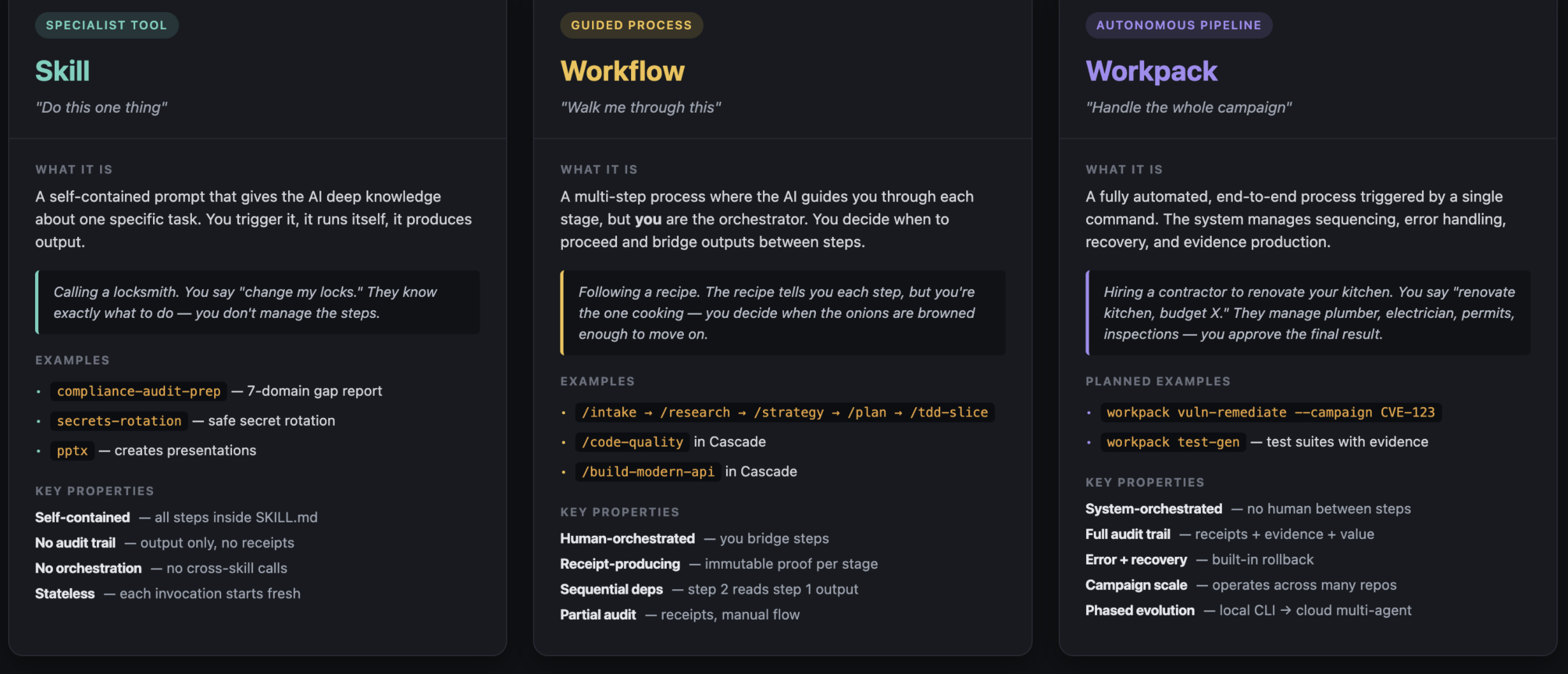
Skill — “Do this one thing”
A skill is a self-contained prompt that gives the AI deep knowledge about one specific task. You trigger it, it runs itself, it produces output. The locksmith analogy that stuck with me: you say “change my locks.” They know exactly what to do — you don’t manage the steps.
Examples: compliance-audit-prep walks 7 control domains and produces a gap report. secrets-rotation guides safe rotation of secrets with the right ordering and rollback. pptx creates PowerPoint presentations with custom brand styling.
A skill is self-contained, has no audit trail, doesn’t orchestrate other skills, and is stateless — every invocation starts fresh.
Workflow — “Walk me through this”
A workflow is a multi-step process where the AI guides you through each stage, but you are the orchestrator. The recipe analogy: the recipe tells you each step, but you’re the one cooking — you decide when the onions are browned enough to move on.
Examples: the AI-SDLC pipeline /intake → /research → /strategy → /plan → /tdd-slice, or Cascade’s /code-quality and /build-modern-api. Each stage produces an immutable receipt; step 2 reads what step 1 produced. The audit trail is partial — receipts exist, but the human ran the flow.
The distinction people miss: skill vs workflow is not about step count. Skills can be multi-step internally. The real difference is who orchestrates. A skill is self-contained — it knows all its own steps. A workflow needs the human to bridge between steps and make judgment calls along the way.
Workpack — “Handle the whole campaign”
A workpack is a fully automated, end-to-end process triggered by a single command. The system manages sequencing, error handling, recovery, and evidence production. The renovation analogy: you say “renovate kitchen, budget X.” The contractor manages the plumber, electrician, permits, inspections — you approve the final result.
A good example of what this looks like: workpack vuln-remediate --campaign CVE-123 --repos [a,b,c]. It scans, triages, fixes, opens PRs, and produces compliance evidence across multiple repos. Or workpack test-gen for generating test suites with evidence.
Properties: system-orchestrated, full audit trail (receipts plus evidence plus business-value proof), built-in error recovery, campaign scale, evolves through phases (local CLI first, cloud multi-agent later).
The trigger for choosing workpack over workflow: does this task span multiple lifecycle stages, need an audit trail, or run at campaign scale? If yes, workpack — regardless of whether one exists today.
One more — Agents (the role variant)
Agents (the role-based kind, not subagents) are domain-scoped personas with specific tools and expertise. They live at .claude/agents/<name>/AGENT.md. The clean way to remember the difference: a skill is task-focused, an agent is role-focused. A compliance-audit-prep skill knows how to execute one specific audit workflow. A code-reviewer agent knows how to think about code review across many contexts.
Packaging — making it portable
Context and capability are useless if every team rebuilds them.
A plugin is a bundled set of skills, workflows, workpacks, agents, rules, and MCP configs that ship as one installable unit. It’s the distribution unit for capability + context.
A marketplace is a shared catalog of plugins — internal or public. It’s the discovery and reuse layer.
The maturity arc looks like this:
Ad-hoc exploration → standardise as skill / workflow → automate as workpack → scale to cloud
This is a maturity path for patterns, not people. Most work starts ad-hoc. The patterns that prove valuable get hardened into skills, then composed into workflows, then promoted to workpacks once you need the audit trail and campaign scale. Plugins and marketplaces are how those patterns escape the team that wrote them.
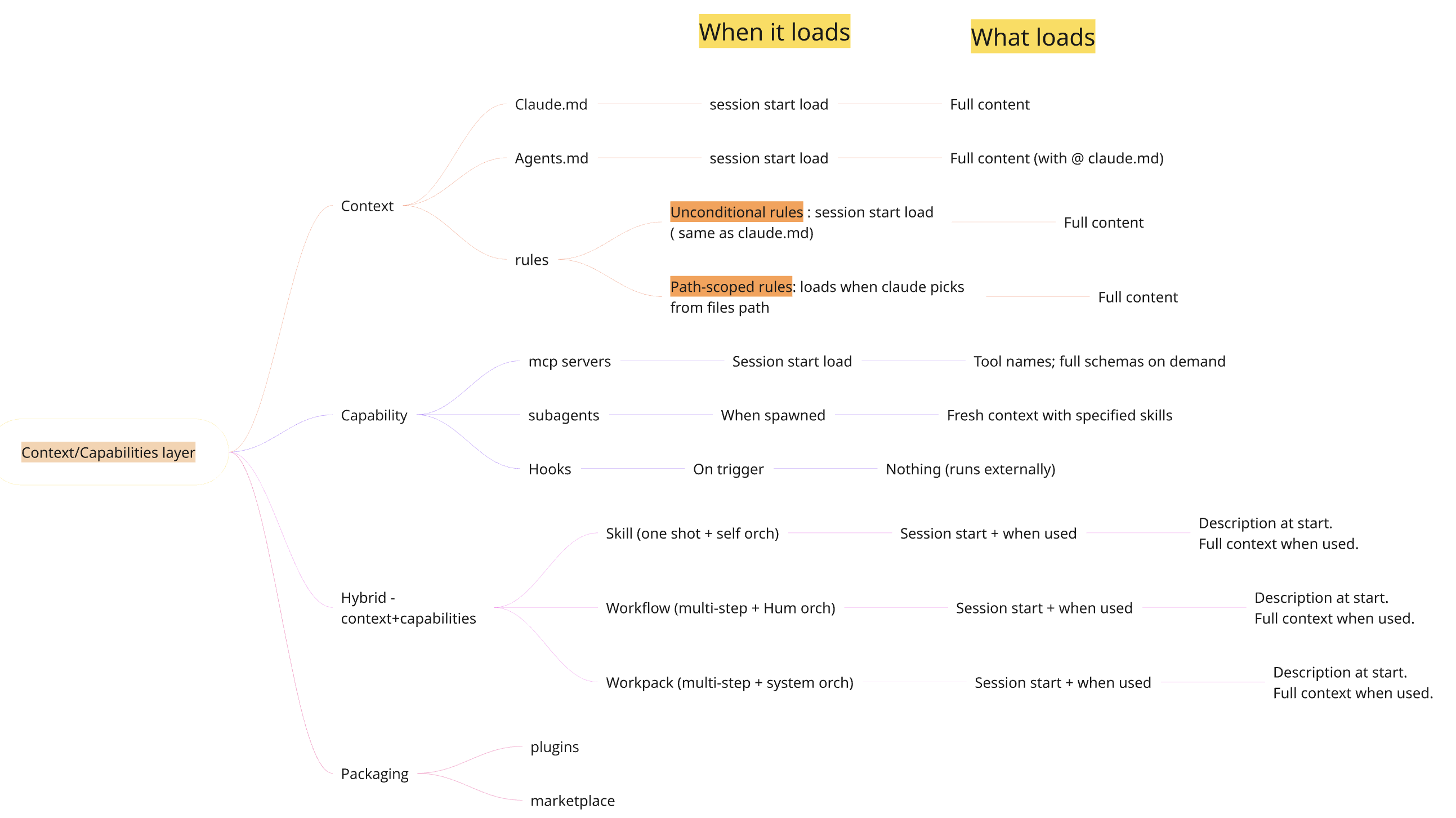
One mental model for context loading
Here’s the picture I keep open mentally when I’m deciding where to put something:
Session start              On use                    Isolated
-----------------          -----------------         -----------------
CLAUDE.md  (full)          Skills (full content)     Subagents (fresh window)
AGENTS.md  (full)          MCP schemas (full)        Hooks (zero — runs externally)
Unconditional rules
MCP names (cheap)
Skills* (descriptions)
* Skills with disableModelInvocation: true load nothing until invoked.
The thing this picture forces you to think about is token economics. CLAUDE.md is “always-on” — every line costs you on every request. MCP names are cheap; schemas are deferred. Subagents and hooks effectively cost nothing in your main session. Path-scoped rules cost nothing until they’re relevant.
If your prompts feel slow or your replies feel scattered, this is usually where to look first.
The settled confusions
A short reference for the questions I’ve been asked the most:
-
CLAUDE.md vs Rules. Both are context. CLAUDE.md is always on. Rules can be conditional on file path.
-
Skill vs Workflow. Both can be multi-step. Skill = AI orchestrates. Workflow = human orchestrates between steps.
-
Workflow vs Workpack. Workflow = human-in-the-loop with partial receipts. Workpack = system-orchestrated with full audit trail and campaign scale.
-
Skill vs Subagent. Skill = task expertise that runs in your context. Subagent = isolated context that returns a summary. Pick subagent when context pollution is the worry.
-
Skill vs Agent. Skill = task. Agent = role.
-
CLAUDE.md vs AGENTS.md. Same job. AGENTS.md is vendor-neutral. Symlink or
@importso you don’t duplicate.
Mindmap of when the context/capability/hybrid constructs load, and their properties:
Take away
If you take one thing from this post, take the diagnostic:
Does removing this lose the AI something it knows? → context. Does it lose something it can do? → capability.
That single question collapses a long list of names into a small handful of slots, and once each construct has a slot, the rest is implementation detail.
The second thing: treat AI setup like onboarding a new engineer. Write the wiki once. Hand over the runbooks once. Set the guardrails once. The reason you’re getting “fancy autocomplete” instead of a useful collaborator is that you’re re-onboarding it every session. Stop.
*Coming in part 2: how I wired this up across multiple repos using mani-tool to build context and capabilities layer for my Observability team, and how it helped teams use AI in a productive ways.